Imagine building a house using only pre-fabricated rooms bought from different manufacturers. One room doesn’t quite fit the foundation; another has windows that don’t open. Eventually, the house becomes unstable.
This is the reality for many business owners in the United States using WordPress. They stack dozens of third-party plugins to achieve simple tasks, resulting in a “Frankenstein” website, slow, insecure, and prone to breaking.
WordPress plugin development is the architectural fix. It allows you to build features that fit your business perfectly, rather than forcing your business to fit software limitations. At NoorSoft Tech, we believe that your website should be an asset that drives revenue, not a liability that requires constant repair.
In this guide, we will move beyond the basics and explore the strategic value of custom development, cost realities, and how to turn unique functionality into a competitive advantage.
Custom vs. Off-the-Shelf: The Business Case
The debate isn’t just about code; it’s about business continuity. While off-the-shelf plugins (like those found in the WordPress repository) are great for generic needs, they often act as “bloatware” for scaling businesses.
The Hidden Cost of “Free” Plugins (The Bloatware Problem)
A generic contact form plugin might include 5,000 lines of code to cover every possible use case, database storage, 20 different email marketing integrations, and drag-and-drop styling. If you only need to send an email to your sales team, you are loading 4,900 lines of useless code every time a customer visits your page.
Custom Development Solution:
A custom plugin contains only the code required for your specific workflow. This results in:
- Faster Core Web Vitals: Google rewards lean code with better rankings.
- Reduced Conflicts: No fighting between Plugin A and Plugin B.
Strategic Ownership and Intellectual Property
When you build a custom plugin, you are building Intellectual Property (IP).
- Off-the-Shelf: You pay a yearly license. If the developer stops updating the plugin (which happens frequently), your business is at risk.
- Custom: You own the code. You control the update schedule. It becomes a transferable asset that increases the valuation of your digital presence.
5 Scenarios When You Need Custom Development
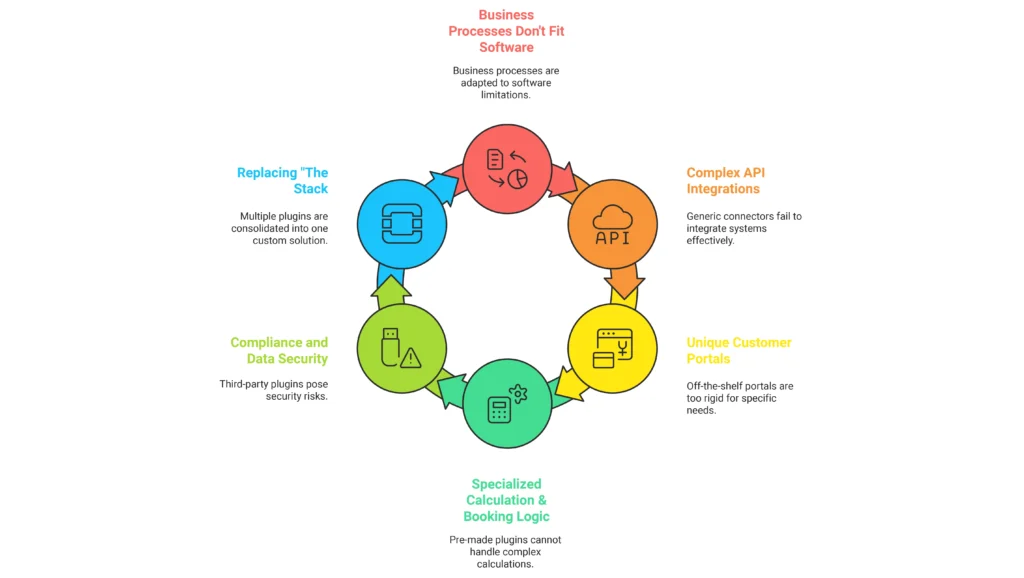
How do you know it’s time to hire a developer? If you find yourself changing your business processes to accommodate your software, you need a custom solution.
1. Complex API Integrations (CRM/ERP)
US businesses often use specific stacks like Salesforce, HubSpot, or custom ERPs. Generic “connector” plugins often fail to map custom fields correctly or sync data in real-time. A custom plugin can facilitate a two-way sync between your website and your internal tools, automating data entry.
2. Unique Customer Portals
If you need a client dashboard that displays specific project statuses, invoices, or secure documents, off-the-shelf membership plugins are often too rigid. Custom dev allows for a tailored User Experience (UX) that matches your brand perfectly.
3. Specialized Calculation & Booking Logic
Does your business offer dynamic pricing? For example, a logistics company in Texas might need a calculator that combines zip codes, weight, and current fuel surcharges. No pre-made plugin can handle that specific math. Custom logic scripts can handle complex variables instantly.
4. Compliance and Data Security
For businesses in healthcare (HIPAA) or finance, relying on a third-party plugin developer to handle data security is a risk. Custom plugins allow you to sanitize and store data exactly according to compliance standards, keeping your liability low.
5. Replacing “The Stack”
We recently audited a client site running 4 different plugins to handle “Events.” One for the calendar, one for the booking, one for the email confirmation, and one for the payment. One custom plugin replaced all four, reducing annual licensing costs by $600 and increasing site speed by 35%.
The Development Lifecycle: From Concept to Code
Professional development isn’t just “writing code.” At NoorSoft Tech, we follow a strict Software Development Life Cycle (SDLC) to ensure quality.
- Discovery & Scope: We define exactly what the plugin must do. “I want a booking system” is too vague. “I want a booking system that syncs with Google Calendar and charges a 50% deposit via Stripe” is a scope.
- Architecture Design: Planning the database structure and how the plugin hooks into WordPress Core.
- Development (Staging): Coding happens in a safe environment, not on your live site.
- Testing (QA): We test against different browsers, mobile devices, and PHP versions.
- Deployment: pushing the plugin to the live site and verifying integration.
- Documentation: You receive a guide on how to use and maintain your new asset.
Cost Factors & ROI: What to Expect
One of the biggest questions we get is, “How much does a custom plugin cost?” While it depends on complexity, transparency is key.
- Simple Functionality ($500 – $1,500): Adding a custom post type, a simple calculator, or a custom widget.
- Medium Complexity ($1,500 – $5,000): API integrations with a CRM, a custom filtering system for real estate or e-commerce products.
- High Complexity ($5,000+): Full SaaS-like functionality, complex booking engines, learning management systems, or Intranets.
The ROI Calculation:
If a custom plugin costs
3,000 but automates a task that saves your admin staff 5 hours a week (3,000 but automates at a that saves our admin staff 5 hours a week(10,000/year in labor), the plugin pays for itself in roughly 4 months.
Expert Insights: Reducing Technical Debt
“The biggest mistake I see business owners make is asking for hard-coded features inside their theme functions.php file. This is a trap. If you change your theme later, you lose your functionality.”
Professional Advice from NoorSoft Tech:
Always separate functionality from design. A custom plugin ensures that even if you completely redesign your website’s look (the theme), your business logic (the plugin) remains intact.
We also strictly adhere to WordPress Coding Standards. This means we use “Hooks and Filters.” Think of WordPress as a house with electrical outlets (Hooks). A bad developer cuts the wires to splice in a new lamp. A good developer simply plugs the lamp into the outlet. This ensures WordPress updates never break your site.
How to Choose the Right Development Partner

Not all developers are created equal. When vetting an agency for WordPress plugin development, ask these questions:
- “Do you provide documentation?” (If not, run. You will be locked to them forever.)
- “Do you use version control (Git)?” (Essential for reverting changes if something breaks.)
- “What happens if WordPress updates?” (They should offer a maintenance period or guarantee compatibility.)
At NoorSoft Tech, we pride ourselves on writing clean, commented, and standard-compliant code that any developer can understand and manage in the future.
FAQs
What is the difference between a WordPress theme and a plugin?
A theme controls the visual design (layout, colors, fonts) of your website. A plugin controls the functionality (features, data processing, behavior). Custom functionality should always be built into a plugin, not the theme.
How long does it take to develop a custom WordPress plugin?
Simple plugins can take 2–5 days. Complex integrations or full-scale applications can take 4–8 weeks depending on the scope and testing requirements.
Is custom plugin development expensive?
It has a higher upfront cost than free plugins but is often cheaper in the long run. You avoid annual licensing fees, reduce potential downtime caused by conflicts, and eliminate manual labor through automation.
Will a custom plugin slow down my website?
No. In fact, it usually speeds it up. Custom plugins are “lean,” meaning they only contain the code necessary for your specific feature, unlike generic plugins that load unused scripts.
Can you modify an existing third-party plugin?
Yes, this is called “forking” or extending a plugin. However, we often recommend building an “add-on” plugin rather than editing the core files of a third-party plugin, so you can still update the original software safely.
Who owns the code after the project is finished?
With NoorSoft Tech, you own the intellectual property (IP) of the custom plugin upon final payment. You are free to modify, sell, or distribute it.
Conclusion
Your website is the digital headquarters of your business. Relying on a patchwork of generic plugins is like building that headquarters on shaky ground. Custom WordPress plugin development offers the stability, speed, and specific functionality required to compete in the US market.
Whether you need to integrate a complex payment gateway, sync with a CRM, or build a unique customer experience, custom code is the bridge between “good enough” and “market leader.”
Ready to streamline your website?
Contact NoorSoft Tech today to discuss your custom plugin requirements.