

Is your website actually winning over customers, or is a clunky mobile experience driving them straight to your competitors?
Choosing a design partner is no longer just about making a site “fit” on a phone; it’s about building a fast, reliable digital storefront that looks and works perfectly for every local lead.
The Shift from Mobile-Friendly to Mobile-First
In the modern B2B ecosystem, “responsive” is no longer a luxury feature, it is the baseline for survival. However, the stakes have evolved. Since Google’s full transition to mobile-first indexing, your mobile site version is now the primary version for crawling and ranking.
Simply shrinking desktop elements to fit a smaller screen often leads to “mobile bloat,” damaging your Core Web Vitals and inflating bounce rates. True technical excellence requires a strategy that achieves conversion parity: ensuring that a lead browsing on a 6.1-inch iPhone has the same high-intent experience as a procurement officer on a 27-inch workstation.
Beyond the Basics: Making Sure Your Website Looks Sharp on Every Device

While many providers offer fluid grids, an expert-level service distinguishes itself by navigating the nuances between Adaptive and Responsive design.
- Media Queries & Breakpoints: Beyond standard “Small, Medium, Large” breakpoints, sophisticated providers use media queries based on content behavior, ensuring the layout never “breaks” at unconventional resolutions.
- Vector Over Raster: A technical partner prioritizes SVG (Scalable Vector Graphics) for icons and logos. Unlike JPEGs or PNGs, SVGs are code-based, ensuring infinite scalability and zero pixelation without adding weight to the payload.
- Dynamic Content Serving (DDS): For complex B2B sites, providers may utilize DDS to serve different HTML/CSS based on the device detected. This allows for lighter mobile experiences without compromising the data-heavy requirements of a desktop portal.
5 Non-Negotiable Technical Standards for Modern Service Providers
1. Core Web Vitals and Performance Optimization
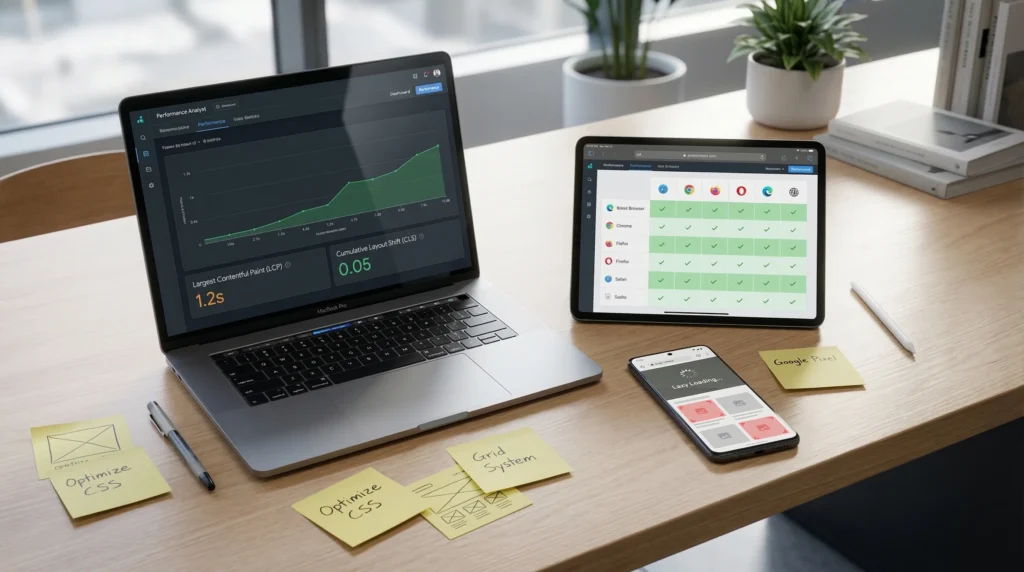
The provider must demonstrate mastery over Largest Contentful Paint (LCP) and Cumulative Layout Shift (CLS). On mobile viewports, CLS is often a silent killer; as images or ads load, elements jump, leading to accidental clicks and user frustration. A top-tier provider uses CSS aspect-ratio boxes to reserve space for assets before they load.
2. Cross-Browser and Cross-OS Parity
A common pitfall is a site that looks perfect on Chrome but breaks on Safari (iOS) or various Android skins (like Samsung Internet). Your provider should use automated testing suites (like BrowserStack) to validate code against the specific rendering engines of WebKit, Gecko, and Blink.
3. Asset Prioritization and Lazy Loading
To prevent mobile bloat, providers must implement lazy loading for non-critical images and defer non-essential JavaScript. By prioritizing the “Critical Rendering Path,” the user can interact with the page while heavier assets load quietly in the background.
4. Touch-Target Engineering and Thumb-Zone Mapping
Ergonomics is a technical discipline. Professional providers design for the “Thumb Zone” the areas of a screen most easily reached during one-handed use. This includes ensuring touch targets are at least 44×44 pixels to meet Apple’s Human Interface Guidelines and prevent “fat-finger” errors.
5. Scalable Component-Based Architecture
Instead of designing static templates, elite firms use Atomic Design. This involves building a library of reusable components (atoms, molecules, organisms) that maintain functional integrity regardless of where they are placed, ensuring long-term scalability of the site’s codebase.
The Website Stress Test: How to Check a Designer’s Work Before You Hire

To outperform the competition, you must look under the hood. Use this Stress Test Checklist when reviewing a potential partner’s previous work:
- View Source for “Div Soup”: Right-click and inspect their work. Is the code clean and semantic, or is it buried in infinite nested <div> tags? Over-complicated code slows down browsers and complicates SEO.
- Throttling Test: Open their portfolio sites on a desktop, go to DevTools, and throttle the network to “Slow 3G.” If the site takes more than 5 seconds to become interactive, they aren’t optimizing for real-world mobile conditions.
- Accessibility (WCAG 2.1): Use a tool like Lighthouse to check if their responsive elements are screen-reader friendly. Accessibility is often the first thing to break in a poorly executed responsive design.
How a Professional Mobile Site Turns Local Visitors into Real Leads
For B2B organizations, the mobile experience is often the “research phase” of the sales funnel. If a technical whitepaper is impossible to read or a “Request a Quote” form is misaligned on a smartphone, you are losing high-value leads before they ever reach their desktop. Expert responsive design reduces friction at the top of the funnel, directly correlating to a lower Cost Per Acquisition (CPA) and higher organic search visibility.
Frequently Asked Questions (FAQ)
What is the difference between a responsive web design service and a mobile-friendly site?
A mobile-friendly site is often a “shrunk-down” version of a desktop site or a separate “m.” subdomain. A responsive site uses a single codebase and fluid grids to intelligently reformat content for any screen size, providing a superior UX and better SEO.
What is the difference between a responsive web design service and a mobile-friendly site?
A mobile-friendly site is often a “shrunk-down” version of a desktop site or a separate “m.” subdomain. A responsive site uses a single codebase and fluid grids to intelligently reformat content for any screen size, providing a superior UX and better SEO.
How long does it take to develop a fully responsive B2B website?
A custom, technically optimized B2B site typically takes 12 to 24 weeks. This timeline accounts for deep UI/UX discovery, component-based development, and rigorous cross-device QA testing.
Will responsive design affect my current SEO rankings?
Yes, positively. Google recommends responsive design because it uses a single URL, making it easier for their algorithms to crawl and index your content without dealing with “duplicate content” issues between mobile and desktop versions.
What is the average cost of professional responsive web design services in the US?
For a mid-to-enterprise level B2B site with custom architecture, prices generally range from $20,000 to $75,000+. Costs vary based on the complexity of integrations and the depth of the design system.
Conclusion: Prioritizing Longevity in Your Web Infrastructure
Selecting a responsive web design service provider in Frisco is a decision that impacts your technical debt for years to come. A partner who prioritizes performance, clean architecture, and user ergonomics will build a site that grows with your business rather than one that needs a total rebuild in 24 months.
Would you like me to conduct a technical “mobile-readiness” audit on your current site or a competitor’s site to identify specific areas for improvement?