
You’ve likely seen the stat: nearly 90% of website visitors bounce after a poor experience. But the “why” is often more painful than the “how.” Most small business websites fail not because they are “ugly,” but because they ignore user intent. If your site doesn’t immediately align with the reason a visitor landed there, they won’t just leave, they’ll head straight to a competitor. Understanding intent is the ultimate link to ROI; it’s the difference between a digital brochure and a lead-generation machine.
Understanding User Intent in the Modern UX Landscape
In 2026, web design has moved beyond “pretty layouts” to psychological mapping. To master this, we must distinguish between Search Intent (the trigger) and User Intent (the goal).
| Feature | Search Intent (The “What”) | User Intent (The “Why”) |
| Origin | The specific query entered into Google. | The psychological state upon landing. |
| Focus | Keywords and SEO rankings. | User goals and conversion paths. |
| Metric | Click-Through Rate (CTR). | Dwell Time and Task Completion. |
While Search Intent gets them to your front door, User Intent is the “Mental Model” they bring inside. If a user arrives with a “Researching” mindset but is met with a high-pressure “Buy Now” popup, you’ve created a cognitive mismatch that kills trust instantly.
The Business Case for Intent-Driven Web Design
For a small business in a competitive market like Frisco, TX, intent-driven design isn’t a luxury, it’s a survival tactic. When your site matches the visitor’s goal, you reduce “friction,” making it effortless for them to say yes.
Furthermore, Google’s RankBrain and modern AI algorithms now prioritize “satisfaction signals.” If users find what they need quickly, your SEO rankings climb. In North Texas, where local competition is fierce, the business that answers the customer’s question the fastest wins the lead. Intent-driven design ensures you are that business.
The 4 Pillars of User Intent in Web Design
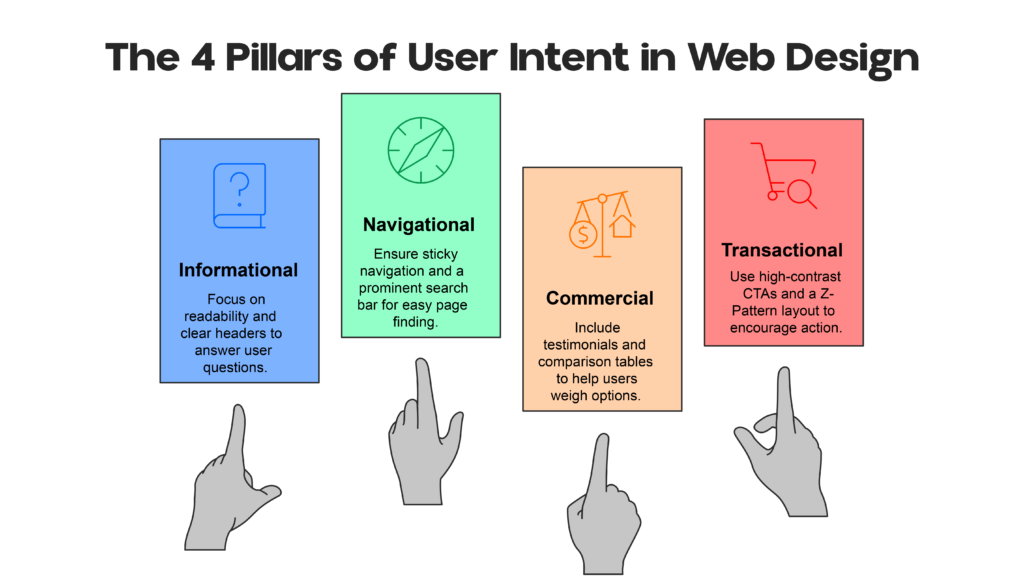
To design effectively, you must categorize every page into one of these four pillars:
- Informational (“I need to know…”): Users are seeking answers.
- Design Response: Prioritize readability with clear headers and bullet points. Use “F-Pattern” layouts.
- Navigational (“I need to find…”): Users are looking for a specific page (e.g., your Login or Contact page).
- Design Response: Keep the navigation menu sticky and the search bar prominent.
- Commercial (“I’m comparing…”): Users are weighing their options.
- Design Response: Feature testimonials, comparison tables, and case studies.
- Transactional (“I’m ready to buy…”): Users want to complete an action.
- Design Response: Use high-contrast CTAs and a “Z-Pattern” layout to lead the eye directly to the booking form or checkout.
How to Identify User Intent (The Discovery Framework)
Stop guessing what your users want and start decoding their behavior:
- Step 1: Reverse-Engineer Keywords. Analyze your Search Console data. Are people finding you via “how-to” questions or “near me” service queries?
- Step 2: Behavior Tracking. Use tools like Microsoft Clarity or Hotjar to view heatmaps. Are users clicking on non-clickable elements? That’s a signal of unmet intent.
- Step 3: Funnel Mapping. Identify where the “leaks” are. If users drop off on your service page, the design likely isn’t providing the “social proof” they need to proceed.
Actionable Tip: Review your internal site search data. If people are frequently searching for “pricing” and it’s buried in your footer, your design is failing their intent.
A Step-by-Step Process to Decode Your Audience
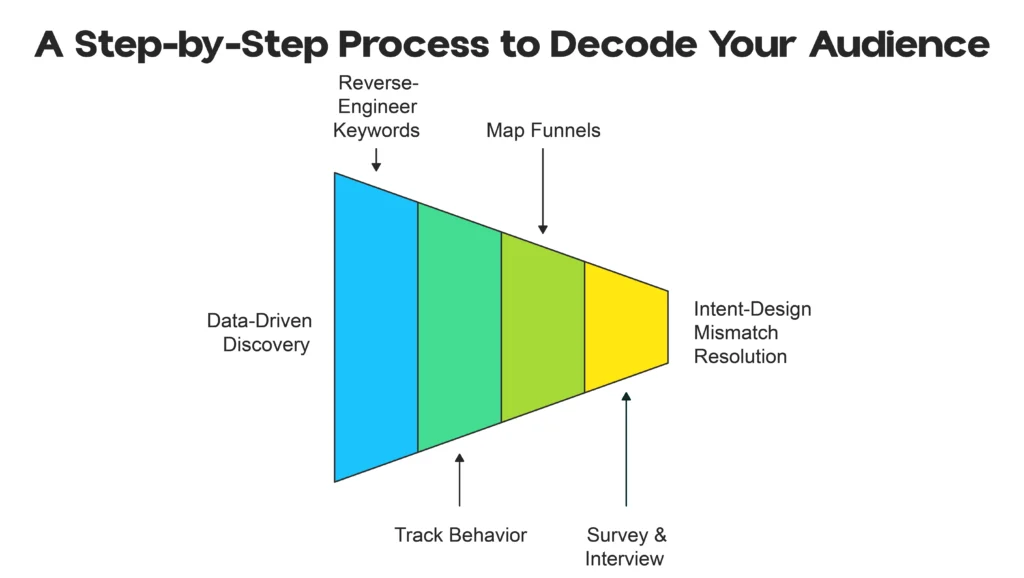
Identifying user intent starts with data-driven discovery. Follow this framework:
Step 1: Reverse-Engineer Keywords
Review Google Analytics or Search Console for top queries driving traffic. What phrases bring visitors? “Emergency plumber Frisco” signals high transactional intent; “DIY plumbing tips” is informational.
Step 2: Track Behavior
Use free/affordable tools like Microsoft Clarity or Hotjar for heatmaps, session recordings, and scroll maps. See where users click, hesitate, or rage-click clear signs of mismatched intent.
Step 3: Map Funnels and Drop-Offs
Analyze where visitors abandon pages (e.g., high exit on service pages?). That’s often an intent-design mismatch. Check internal site search queries what are users typing when they can’t find something?
Step 4: Survey & Interview
Ask recent customers: “What were you hoping to find when you visited our site?” Combine qualitative insights with quantitative data.
This process reveals mismatches quickly. Fix them, and conversions follow.
Turning Insights into Interface: Intent-Driven UX Optimization
Application is where the magic happens. Your layout should shift based on the page’s purpose. For Informational content, use the F-Pattern to accommodate scanning. For Transactional landing pages, use the Z-Pattern to guide the user from the headline to the CTA.
CTA Strategy: Never use a “Buy Now” button on an educational blog post; it’s too aggressive. Instead, use a “Download the Guide” or “Learn More” button to nurture the relationship.
The Mobile Factor: Intent is often device-dependent. A user on a desktop in Frisco might be researching “types of roofing materials” (Informational), while a mobile user searching “emergency roof repair Frisco” has high Transactional intent. Your mobile site must prioritize “Click-to-Call” buttons for these high-intent moments.
Common Mistakes: Why Intent-Based Designs Fail

- The “One-Size-Fits-All” CTA: Using “Contact Us” on every single page regardless of the user’s journey stage.
- Over-Designing: Using flashy animations that slow down the site and distract from the primary goal.
- Ignoring Intent Signals: Failing to update your content as local search trends change. If “hybrid service” becomes a trend in Frisco, your design should reflect that intent.
Bridging Intent with Professional Web Design in Frisco, TX
Building a “pretty” website is easy; building one that thinks like your customer is a science. At our agency, we specialize in Web Design Frisco TX services that map every pixel to a specific business goal. Local businesses need more than a template; they need a digital experience tailored to the specific behaviors of the North Texas consumer.
If you’re unsure if your site currently meets user intent, our Frisco-based team can perform a UX audit to identify and plug your conversion leaks.
Frequently Asked Questions
What is user intent in web design?
It is the specific goal or “why” behind a user’s visit. Designing for intent means ensuring the page layout and content help the user achieve that goal as quickly as possible.
How does user intent affect conversions?
When design matches intent, friction is removed. Users don’t have to “think” about what to do next, which naturally leads to higher conversion rates and lower bounce rates.
What is the difference between UX and user intent?
UX (User Experience) is the overall feel and usability of the site. User Intent is the motivation that drives the user. Good UX is the vehicle; intent is the destination.
How do you optimize a small business website for intent?
By mapping each page of your site to a stage in the buyer’s journey Informational, Navigational, Commercial, or Transactional and adjusting the layout and CTAs accordingly.
Building a Future-Proof Website
User intent isn’t just a 2026 design trend; it is the foundation of effective UX. As search engines and users become more sophisticated, the “one-size-fits-all” approach to web design will continue to fade. A website that truly understands its user is a website that grows a business.